The classroom inside the notebook — padho.ai
How we designed a shared thinking space where teacher and student solve problems together and why every design decision is rooted in how learning actually happens.
Shawn opened a maths problem. Read it once. Read it again. Then typed two words into the coach panel: "Guide me."
The coach responded immediately. "No worries at all, Shawn. We can definitely break this problem down together. First, let us get the problem statement on the board. What information do you think is important here?"
What happened next is the product we have spent the last six months building and this is the story of every design decision behind it.
Most edtech products separate the lesson from the work. You watch a video, then close it and open a blank page. The explanation and the solving never happen in the same place at the same time.
We wanted to build something different. An interface where the teacher is present in the room while you think. Not a pre-recorded voice, not a solution engine. A live coach who watches you work, asks questions when you get stuck, and writes on the same surface you are writing on.
One surface. Two hands.
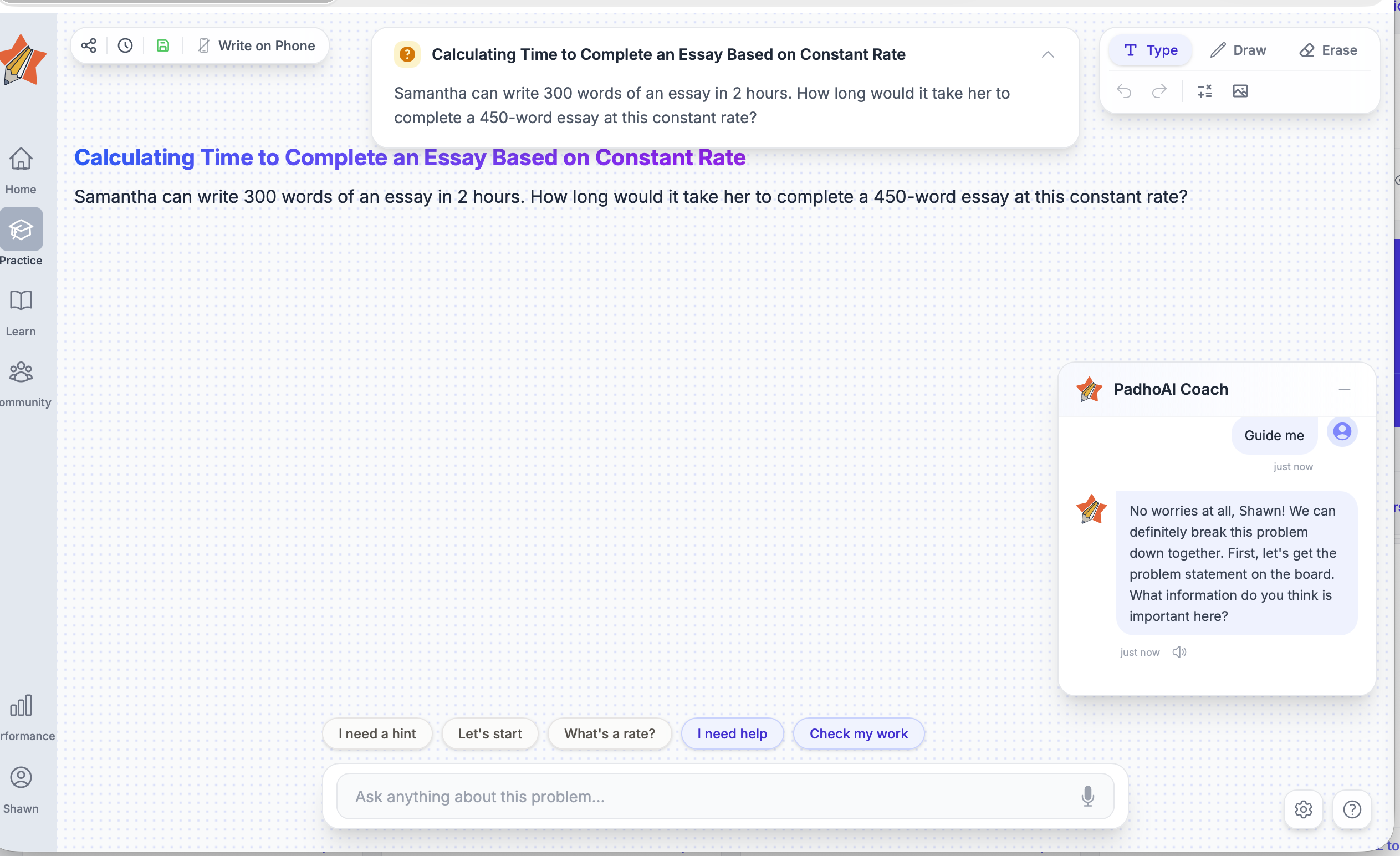
The notebook in padho.ai is a single, shared canvas and both the PadhoAI Coach and the student write on it.
Shawn typed "Words and hours." The coach responded, then put the setup directly on the board. A section heading appeared in violet: What is a Rate? A definition followed. Then a formula. Then a second section, Samantha's Writing Rate, with the values from the problem laid out, the equation set up, and a blank input waiting for Shawn to fill in the answer.
The dot grid underneath is structure without imposition. Enough to align handwriting and diagrams, not enough to impose a format. Students can type, draw, or bring in an image. The notebook welcomes every mode of thinking.
The teacher structuring the problem on the shared canvas does something a chat bubble never could. It externalises the thinking process. The student does not receive a hint; they see the problem being reorganised. Structure itself becomes the instruction.
A teacher who never gives the answer
The PadhoAI Coach panel is persistent. Everything said between coach and student stays there. The entire conversation is the context for what comes next. The coach remembers that Shawn said "Words and hours." It builds on that. It remembers.
Notice what the coach put on the board. The formula. The given values. A blank input with a question mark. Everything Shawn needs to arrive at the answer himself. The coach never typed "150 words per hour." It set up the conditions for Shawn to get there. The chat narrates, the notebook shows.
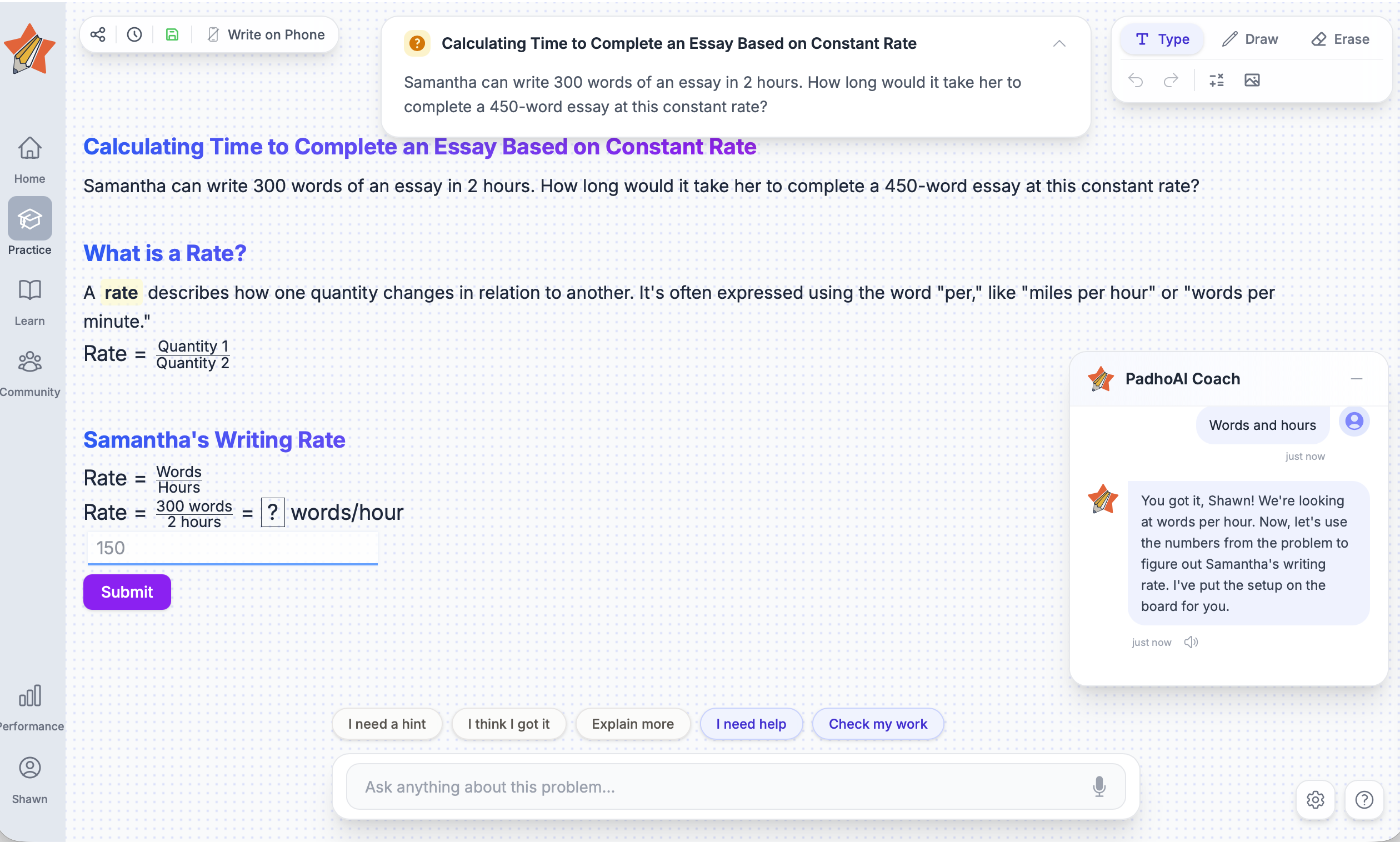
The conversation never resets. Every exchange is context for the next question.
Nudges that force thinking, not shortcuts to answers
Above the input field is a row of chips. They change based on where the student is in the problem. At the start of a fresh problem, they look like this:
After the coach has written the given values on the board and the student has started to engage, the chips shift:
Each one triggers a different coaching response. "What's a rate?" opens a concept explanation. "Check my work" triggers evaluation with the notebook content as context. "I need a hint" gives the smallest possible push, not the answer.
The free text input, labelled "Ask anything about this problem..." with a microphone icon, is the escape valve. Chips handle the common cases. Free text handles everything else. Half-formed thoughts, confusions that do not fit a category, speaking out loud what you are thinking. The microphone means students can talk through their reasoning the way they would with a human tutor sitting next to them.
Chips reduce the activation energy for engagement without removing the thinking. A blank input field can feel intimidating when stuck. Chips say: here are some directions you can go. The student still chooses. The coach still responds to that choice, not to a pre-set path.
Your phone as a pen
Just tap this button in the top bar:
Connect your smartphone and your phone screen becomes a live drawing surface for the notebook. No stylus required. No special hardware. The phone sitting next to you on the desk becomes the input device. For students who think by writing, working through a ratio problem with actual fractions or sketching a geometry diagram, this returns the physical act of handwriting to a digital workspace.
Most Indian students already hold a smartphone while studying. Write on Phone does not introduce a new device into the workflow. It integrates the one already in their hand. The setup friction is near-zero.
These design decisions are ongoing. If you are a designer, educator, or student with thoughts on how a learning interface should feel, we would love to hear from you at reach@padho.ai
Try padho.ai at learn.padho.ai